
Binary Search
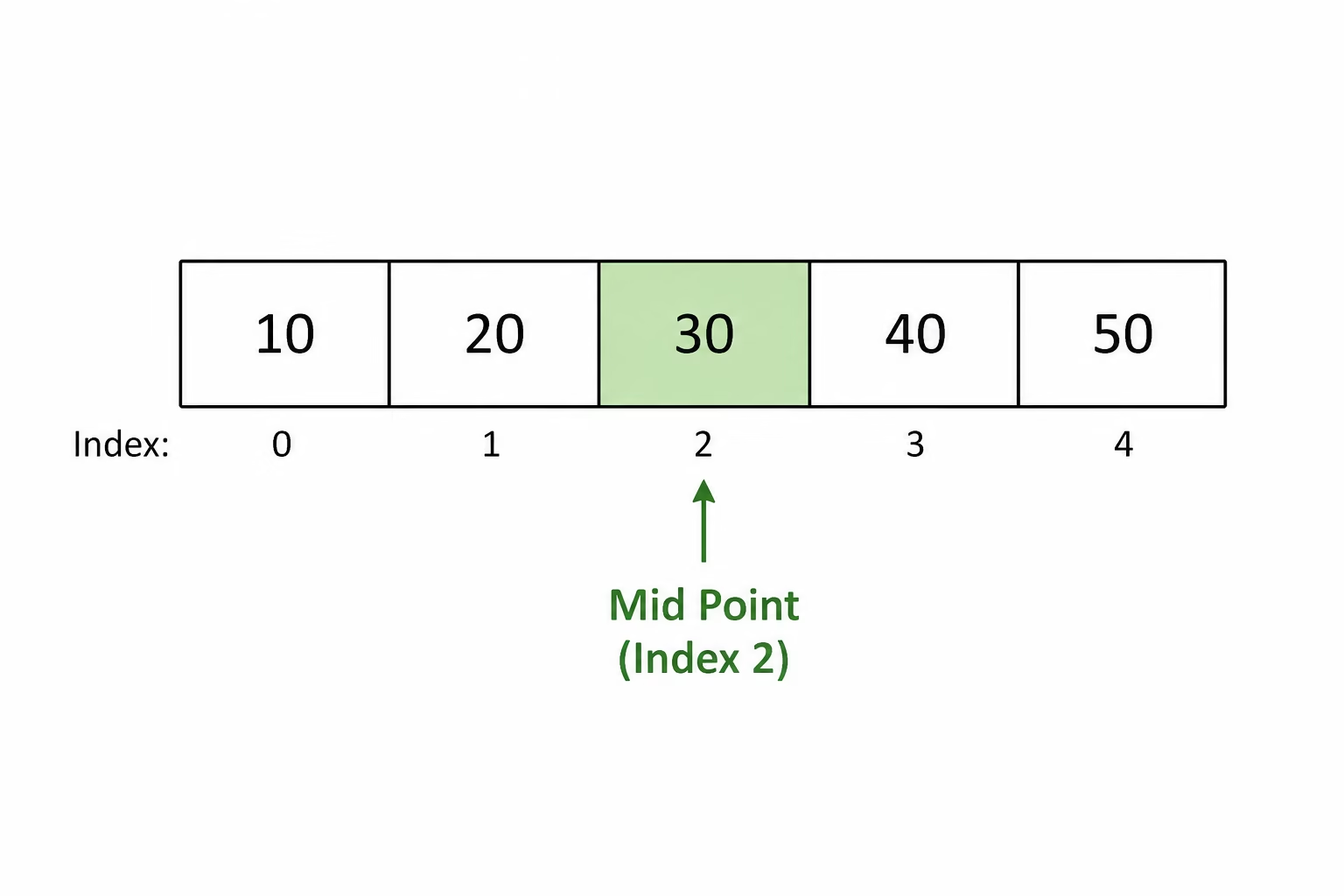
Binary search is an efficient searching algorithm that finds a target value in a sorted list. It repeatedly checks the middle item of the list. If the target is smaller, it searches the left half; if the target is larger, it searches the right half. This process continues until the target is found or there are no items left to search.
It is called binary search because the search area is divided into two halves after each comparison, making it much faster than checking every item one by one
def binary_search(array, target):
    start = 0
    end = len(array)-1
    found = False
    while not found and start <= end:
        mid = int((start + end) / 2)
        if target == array[mid]:
            found = True
        elif target > array[mid]:
            start = mid + 1
        else:
            end = mid - 1
    if found == True:
        print("Found at position", mid)
    else:
        print("Not found")

numbers = [0,1,2,3,4,5,6,7,8,9,10]
binary_search(numbers, 8)
# Binary Search
def binary_search(array, target):
    # Set the start position to the first item
    start = 0
    # Set the end position to the last item
    end = len(array) - 1
    # Variable used to track whether the item has been found
    found = False
    # Repeat until the item is found or there are no items left to search
    while not found and start <= end: # Calculate the middle position mid = int((start + end) / 2) # Check if the target is at the middle position if target == array[mid]: # Item found found = True # If the target is larger, search the right half elif target > array[mid]:
            start = mid + 1
        # Otherwise search the left half
        else:
            end = mid - 1
    # Display the result
    if found == True:
        print("Found at position", mid)
    else:
        print("Not found")

# Main
numbers = [0,1,2,3,4,5,6,7,8,9,10]
binary_search(numbers, 8)
- Start with a sorted list of data.
- Set the start and end positions of the search range.
- Find the middle item of the current search range.
- Compare the target value with the middle item.
- If the target matches the middle item, the search is complete.
- If the target is greater than the middle item, search only the right half of the list.
- If the target is less than the middle item, search only the left half of the list.
- Repeat the process until the target is found or there are no items left to search.
- If the search range becomes empty, the target is not in the list.
PROCEDURE binary_search(list,target)
    DECLARE low INITIALLY 0
    DECLARE high INITIALLY length(list)-1
    DECLARE mid INITIALLY 0
    DECLARE found INITIALLY FALSE
    WHILE NOT found AND low <= high
        SET mid TO (low+high)/2
        IF target = list[mid] THEN
            SEND "Found at position", mid TO DISPLAY
            SET found TO TRUE
        ELSE IF target > list[mid] THEN
            SET low TO mid+1
        ELSE
            SET high TO mid–1
        END IF
    END WHILE
    IF found = FALSE THEN
        SEND "Target not found" TO DISPLAY
    END IF
END PROCEDURE
Task 1 - Find The Position
A library stores books by their reference number.
references = [101, 125, 143, 167, 189, 210, 245]
Use a binary search to find the position of reference number 167.
Output the index if found.
Enter reference number to search for: 125
Found at position 1
# Main
references = [101, 125, 143, 167, 189, 210, 245]
reference = int(input("Enter reference number to search for: "))
binary_search(references, reference)
# Binary Search
def binary_search(array, target):
    start = 0
    end = len(array)-1
    found = False
    while not found and start <= end: mid = int((start + end) / 2) if target == array[mid]: found = True elif target > array[mid]:
            start = mid + 1
        else:
            end = mid - 1
    if found == True:
        print("Found at position", mid)
    else:
        print("Not found")

# Main
references = [101, 125, 143, 167, 189, 210, 245]
reference = int(input("Enter reference number to search for: "))
binary_search(references, reference)
# Binary Search
def binary_search(array, target):
    # Set the start position to the first item in the array
    start = 0
    # Set the end position to the last item in the array
    end = len(array) - 1
    # Variable used to track whether the target has been found
    found = False
    # Continue searching while the target has not been found
    # and there are still items left to search
    while not found and start <= end: # Calculate the middle position of the current search area mid = int((start + end) / 2) # Check if the target matches the middle item if target == array[mid]: # Target found found = True # If the target is larger, search the right half elif target > array[mid]:
            start = mid + 1
        # Otherwise search the left half
        else:
            end = mid - 1
    # Display the result
    if found == True:
        print("Found at position", mid)
    else:
        print("Not found")

# Main
# Sorted list of book reference numbers
references = [101, 125, 143, 167, 189, 210, 245]
# Ask the user for a reference number to search for
reference = int(input("Enter reference number to search for: "))
# Call the binary search function
binary_search(references, reference)
Task 2 - Name Length Ranking
A class has created a leaderboard of pupil names, ordered from shortest name to longest name.
names = ["Jo", "Amy", "Liam", "Chloe", "Daniel", "Rebecca", "Alexander"]
The pupils want an app that lets them enter their name and find where their name would rank in the list of longest names.
Use a binary search, but compare the length of the names using len().
Before Enter your name: Amy
Found at position 1
# Main
names = ["Jo", "Amy", "Liam", "Chloe", "Daniel", "Rebecca", "Alexander"]
name = input("Enter your name: ")
binary_search(names, name)
# Binary Search
def binary_search(array, target):
    start = 0
    end = len(array)-1
    found = False
    while not found and start <= end: mid = int((start + end) / 2) if len(target) == len(array[mid]): found = True elif len(target) > len(array[mid]):
            start = mid + 1
        else:
            end = mid - 1
    if found == True:
        print("Found at position", mid)
    else:
        print("Not found")

# Main
names = ["Jo", "Amy", "Liam", "Chloe", "Daniel", "Rebecca", "Alexander"]
name = input("Enter your name: ")
binary_search(names, name)
# Binary Search
def binary_search(array, target):
    # Set the start position to the first item in the array
    start = 0
    # Set the end position to the last item in the array
    end = len(array) - 1
    # Variable used to track whether a matching name length is found
    found = False
    # Continue searching while the item has not been found
    # and there are still items left to search
    while not found and start <= end: # Calculate the middle position of the current search area mid = int((start + end) / 2) # Check if the target name has the same length # as the name at the middle position if len(target) == len(array[mid]): # Matching length found found = True # If the target name is longer, search the right half elif len(target) > len(array[mid]):
            start = mid + 1
        # Otherwise search the left half
        else:
            end = mid - 1
    # Display the result
    if found == True:
        print("Found at position", mid)
    else:
        print("Not found")

# Main
# Names sorted from shortest to longest
names = ["Jo", "Amy", "Liam", "Chloe", "Daniel", "Rebecca", "Alexander"]
# Ask the user to enter their name
name = input("Enter your name: ")
# Search for where a name of that length appears in the array
binary_search(names, name)
Task 3 - Cinema Times
A cinema stores show times using the 24-hour clock.
The show times are stored in ascending order.
showTimes = [10, 12, 14, 16, 18, 20, 22]
movies = ["Toy Story", "Shrek", "Frozen", "Spider-Man", "Batman", "Avatar", "Jaws"]
A customer enters a show time and wants to know which movie is showing.
Use a binary search to find the show time, then use the position to display the matching movie.
Enter show time: 18
Movie: Batman
# Main
showTimes = [10, 12, 14, 16, 18, 20, 22]
movies = ["Toy Story", "Shrek", "Frozen", "Spider-Man", "Batman", "Avatar", "Jaws"]
showTime = int(input("Enter show time: "))
binary_search(showTimes, movies, showTime)
# Binary Search
def binary_search(showTimes, movies, target):
    start = 0
    end = len(showTimes) - 1
    found = False
    while not found and start <= end: mid = int((start + end) / 2) if target == showTimes[mid]: found = True elif target > showTimes[mid]:
            start = mid + 1
        else:
            end = mid - 1
    if found == True:
        print("Movie:", movies[mid])
    else:
        print("No movie found at that time")

# Main
showTimes = [10, 12, 14, 16, 18, 20, 22]
movies = ["Toy Story", "Shrek", "Frozen", "Spider-Man", "Batman", "Avatar", "Jaws"]
showTime = int(input("Enter show time: "))
binary_search(showTimes, movies, showTime)
# Binary Search
def binary_search(showTimes, movies, target):
    # Set the start position to the first item
    start = 0
    # Set the end position to the last item
    end = len(showTimes) - 1
    # Variable used to track whether the show time has been found
    found = False
    # Continue searching while the show time has not been found
    # and there are still items left to search
    while not found and start <= end: # Calculate the middle position mid = int((start + end) / 2) # Check if the target matches the middle show time if target == showTimes[mid]: # Show time found found = True # If the target is later, search the right half elif target > showTimes[mid]:
            start = mid + 1
        # Otherwise search the left half
        else:
            end = mid - 1
    # Display the matching movie
    if found == True:
        print("Movie:", movies[mid])
    # Display an error message if not found
    else:
        print("No movie found at that time")

# Main
# List of show times in ascending order
showTimes = [10, 12, 14, 16, 18, 20, 22]
# List of movies that correspond to each show time
movies = ["Toy Story", "Shrek", "Frozen", "Spider-Man", "Batman", "Avatar", "Jaws"]
# Ask the user for a show time
showTime = int(input("Enter show time: "))
# Search for the show time and display the matching movie
binary_search(showTimes, movies, showTime)
Task 4 - Candidate Numbers
An exam centre stores candidate numbers in an array.
Unfortunately, the candidate numbers are not currently sorted.
candidateNumbers = [5231, 4182, 6023, 4871, 5502, 4015, 5740]
A member of staff wants to search for a candidate number.
Before a binary search can be used, the array must be sorted into ascending order.
Write a program that:
- Sorts the candidate numbers into ascending order
- Allows the user to enter a candidate number
- Uses a binary search to find the candidate number
- Displays the position where it was found
Enter candidate number: 5502
Found at position 4
# Main
candidateNumbers = [5231, 4182, 6023, 4871, 5502, 4015, 5740]
candidateNumbers = bubble_sort(candidateNumbers)
candidateNumber = int(input("Enter candidate number: "))
binary_search(candidateNumbers, candidateNumber)
# Bubble Sort
def bubble_sort(array):
    n = len(array) - 1
    swapped = True
    while swapped and n >= 0:
        swapped = False
        for i in range(0, n):
            if array[i] > array[i + 1]:
                temp = array[i]
                array[i] = array[i + 1]
                array[i + 1] = temp
                swapped = True
        n = n - 1
    return array

# Binary Search
def binary_search(array, target):
    start = 0
    end = len(array)-1
    found = False
    while not found and start <= end: mid = int((start + end) / 2) if target == array[mid]: found = True elif target > array[mid]:
            start = mid + 1
        else:
            end = mid - 1
    if found == True:
        print("Found at position", mid)
    else:
        print("Not found")

# Main
candidateNumbers = [5231, 4182, 6023, 4871, 5502, 4015, 5740]
candidateNumbers = bubble_sort(candidateNumbers)
candidateNumber = int(input("Enter candidate number: "))
binary_search(candidateNumbers, candidateNumber)
# Bubble Sort
def bubble_sort(array):
    # Set the last position that needs checked
    n = len(array) - 1
    # Variable used to track whether any swaps were made
    swapped = True
    # Continue sorting while swaps are being made
    while swapped and n >= 0:
        swapped = False
        # Compare neighbouring items
        for i in range(0, n):
            # Swap items if they are in the wrong order
            if array[i] > array[i + 1]:
                temp = array[i]
                array[i] = array[i + 1]
                array[i + 1] = temp
                swapped = True
        # Reduce the size of the unsorted section
        n = n - 1
    return array

# Binary Search
def binary_search(array, target):
    # Set the start position to the first item
    start = 0
    # Set the end position to the last item
    end = len(array)-1
    # Variable used to track whether the candidate number has been found
    found = False
    # Continue searching while the item has not been found
    # and there are still items left to search
    while not found and start <= end: # Calculate the middle position mid = int((start + end) / 2) # Check if the target matches the middle item if target == array[mid]: # Candidate number found found = True # If the target is larger, search the right half elif target > array[mid]:
            start = mid + 1
        # Otherwise search the left half
        else:
            end = mid - 1
    # Display the result
    if found == True:
        print("Found at position", mid)
    else:
        print("Not found")

# Main
# List of candidate numbers
candidateNumbers = [5231, 4182, 6023, 4871, 5502, 4015, 5740]
# Sort the candidate numbers into ascending order
candidateNumbers = bubble_sort(candidateNumbers)
# Ask the user for a candidate number to search for
candidateNumber = int(input("Enter candidate number: "))
# Search for the candidate number
binary_search(candidateNumbers, candidateNumber)
Task 5 - Last Occurrence (Race Times)
The following array contains unsorted race times in seconds.
race_times = [245, 252, 261, 268, 274, 252, 281, 252]
Write a program that bubble sorts the array, searches for a race time entered by the user and displays the last position where that time occurs.
Enter time to search for: 252
First position found at position 1
Set race_times to [245, 252, 261, 268, 274, 252, 281, 252]
Bubble sort race_times
Get target from user
Search race_times for last occurrence of target
Task 6 - First Occurrence (Auction)
An auction house stores bid values and bidder names in parallel arrays. The bids have already been sorted into ascending order, and each bidder name is stored at the same position as their corresponding bid.
The auction house would like to be able to search for who was the first bidder to place a specific bid value. If multiple bidders placed the same bid, the program should display the name associated with the first occurrence of that value in the array.
bids = [45, 55, 60, 70, 70, 70, 90]
bidders = ["Ali", "Cara", "Gus", "Ben", "Dan", "Faye", "Eva"]
Write a program that bubble sorts the array, searches for a race time entered by the user and displays the first position where that time occurs.
For example, the bid value 70 appears three times. The first occurrence is at position 3, so the bidder Ben should be displayed.
Write a binary search algorithm that:
- Accepts a bid value from the user
- Searches for the first occurrence of that bid value
- Displays the name of the bidder associated with that first occurrence
Enter bid: 70
First matching bid was placed by Ben