
Internal CSS
Internal CSS is CSS code written inside an HTML document.
The CSS code is placed between <style> and </style> tags in the <head> section of the webpage.
Internal CSS Example
<head>
    <title>My First CSS Webpage</title>
    <style>
        h1 {
            color: blue;
            background-color: green;
        }
    </style>
</head>
In this example, the CSS changes the colour of the heading to blue.
Understanding a CSS Rule
CSS uses rules to tell the browser how HTML elements should look.
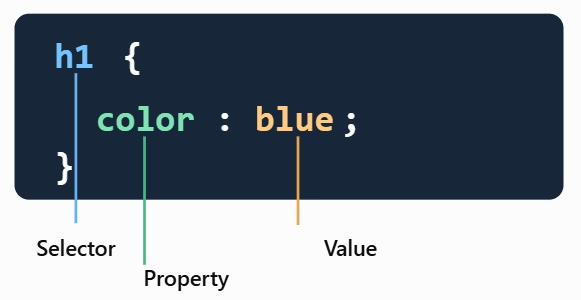
A CSS rule contains three important parts:
- Selector – identifies the HTML elements that will be changed, such as h1 or p
- Property – identifies what will be changed, such as color
- Value – specifies how the property will be changed, such as blue
Styling Different HTML Elements
<style>
    h1 {
        color: blue;
    }

    p {
        color: green;
    }
</style>
This CSS makes all <h1> headings blue and all <p> paragraphs green.