
D - Database Login
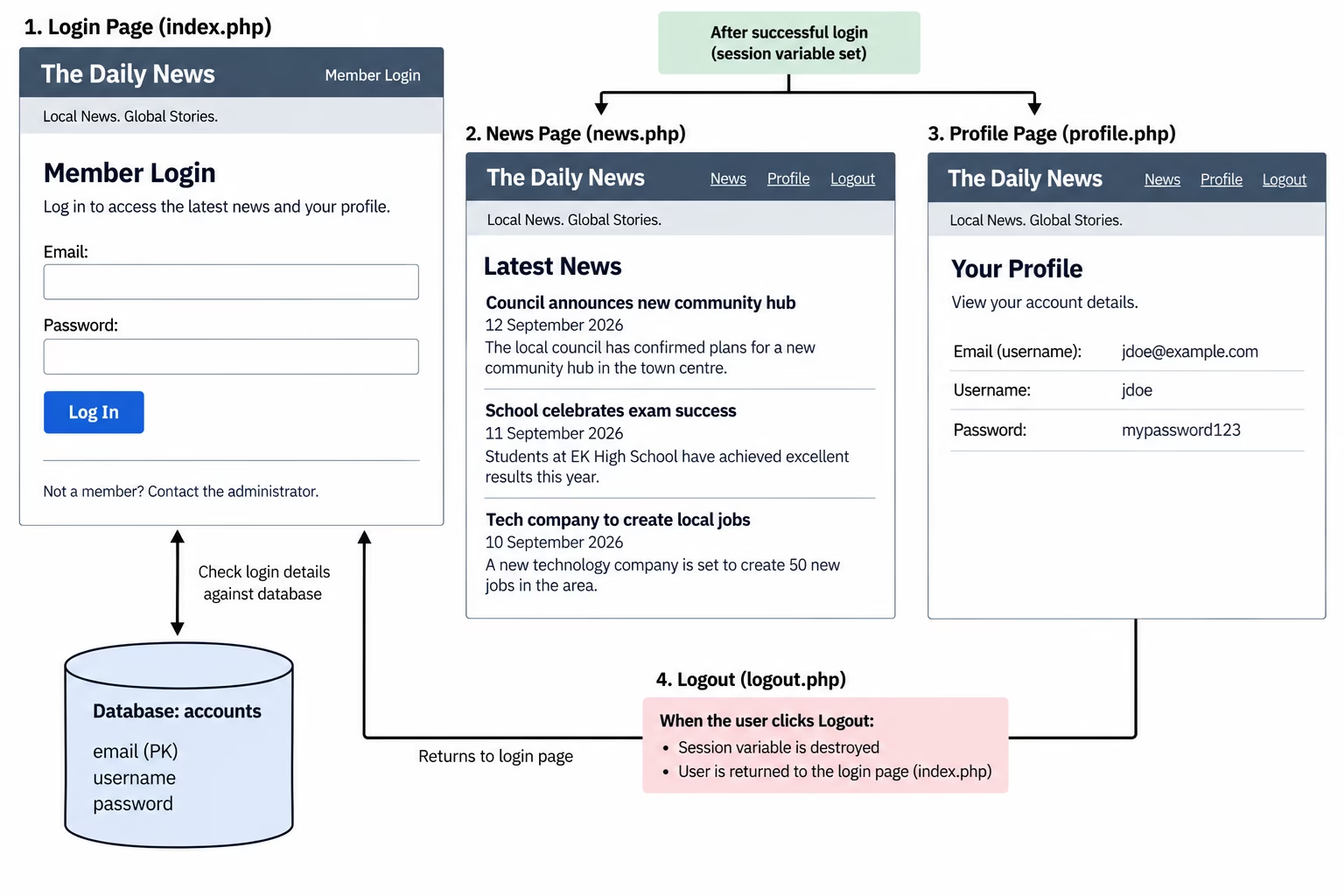
The Daily News requires a secure members area for its website. Registered users must log in using details stored in a database. Once successfully logged in, the user can access the latest news and view their account details. A session variable should be used to keep the user logged in as they move between pages. Users who have not logged in must not be able to access the News or Profile pages.
The system must also allow the user to log out, ending their session and returning them to the login page.
Requirements
- Create an accounts database table containing:
- email – primary key
- username
- password
- Create a login page that:
- accepts an email address and password
- checks the details against the accounts database
- creates a session variable when the login is successful
- Create a News page that:
- can only be viewed by logged-in users
- displays at least three news stories
- provides links to News, Profile and Logout
- Create a Profile page that:
- can only be viewed by logged-in users
- displays the logged-in user’s email, username and password from the database
- provides links to News, Profile and Logout
- Create a Logout page that:
- destroys the user’s session
- provides a link back to the login page
- Use the session variable on protected pages to check whether the user is logged in
Task
CREATE DATABASE dailynews;

USE dailynews;

CREATE TABLE accounts (
    email VARCHAR(100) PRIMARY KEY,
    username VARCHAR(50),
    password VARCHAR(50)
);

INSERT INTO accounts (email, username, password)
VALUES
('john@email.com', 'John', 'news123'),
('sarah@email.com', 'Sarah', 'password1'),
('mark@email.com', 'Mark', 'dailynews');
$email = $_POST["email"];
$password = $_POST["password"];

$sql = "SELECT * FROM accounts
        WHERE email='$email'
        AND password='$password'";

$result = mysqli_query($conn, $sql);

if (mysqli_num_rows($result) == 1) {

    $_SESSION["loggedin"] = true;

    echo "<p>Login successful.</p>";
    echo "<p><a href='news.php'>Continue to News</a></p>";

}
The code above gets the email address and password entered into the login form and uses them to search the accounts table in the database. The SQL query checks for a record where both the email and password match. If exactly one matching record is found, a session variable is created to store that the user is logged in.
Possible Solution
To display the correct details on the Profile page, the website needs a way to identify which user is currently logged in. When the user successfully logs in, their email address should be saved as a session variable. As the email address is the primary key in the accounts table, it can later be used on the Profile page to search the database for that specific account. The matching record can then be retrieved and the user’s email, username and password displayed on the page.